Searching great energy plans for you

one moment...

Message Title

Message subtitle
Back to Help Centre

Finding your NMI or MIRN

You may need your NMI (National Meter Identifier) or MIRN (Meter Installation Registration Number) when speaking with us about your energy account or meter. These numbers help identify your electricity or gas connection and can be found on your bill or meter.

How to find your NMI or MIRN

Log in to your MyENGIE account and navigate to your bills. To find your NMI, download or view an electricity bill. To find your MIRN, download or view a gas bill.

You’ll find your NMI or MIRN on page one of your bill, within the Customer number section on the right-hand side of the page.
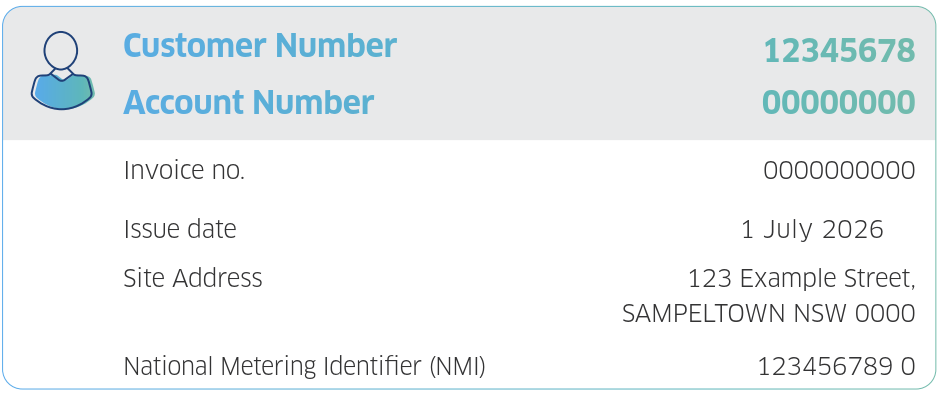
You’ll find your NMI or MIRN on page one of your bill, within the Customer number section on the right-hand side of the page.

faqbot_img

Have a question? Genie is here to help!

We found this answer for you.

Not what you’re looking for?

Sorry, we don't have any information about this topic. Please chat to our support team

Our virtual assistant searches for answers to frequently asked questions on this contact page. This virtual assistant doesn't have access to your personal information and may make errors. If you have any questions, please visit the website.

Do you have another question?

Where can I find a copy of my invoice?

Looking for the answer to your question

Was this answer helpful?

thumb_uploader_icon
thumb_downloader_icon

We are sorry the answer did not meet your expectations. We're here to help! Please contact our support team and we'll get back to you as soon as possible.